Maintainability in the Face of API Complexity
The what, why, and how of API gateways.
An API gateway is a component that routes traffic to the backend and decouples clients from API contracts. It encapsulates a complex application architecture by fronting it with a cohesive API interface. Beyond encapsulation and reverse proxying, they may also offload cross-cutting concerns from individual services, such as authentication, rate limiting, and request logging.
An Identity Crisis#
Many tools for request management and processing have emerged in recent years. As with data systems, where data-stores are used as message queues and message queues have database-like durability guarantees, the boundaries between proxies, meshes, and gateways are becoming blurred.
To cut through the confusion, this article assumes the following main responsibilities per solution:
- Service mesh. A dedicated network infrastructure that layers onto your services, offloading inter-service communication functions, such as encryption, observability, and resilience mechanisms.
- API gateway. A component that provides a cohesive abstraction across the application architecture while offloading edge functions on behalf of individual services.
We’ll now look at the “why” of API Gateways and get into a code example later.
Development is Maintenance#

Photo by Guilherme Cunha on Unsplash
It is well known that the majority of the cost of software is in its ongoing maintenance. All enhancements and fixes post-delivery are considered “maintenance work”: keeping systems operational, analyzing failures, adapting to different platforms, fixing bugs, and repaying technical debt. We should design systems that can easily adapt to changing requirements, making maintenance mode a little less painful.
“Always code as if the guy who ends up maintaining your code will be a violent psychopath who knows where you live” ― John Woods
Change is Inevitable#
Business priorities change, underlying platforms change, legal and regulatory requirements change, your users change! It’s no coincidence that the majority of design principles focus on making things “easier to change.” Whether it’s isolating concerns between modules (decoupling), masking complex interactions behind simple façades, or simply not repeating ourselves (DRY); We should aim for evolvable systems that allow for easy future adaptations.

Photo by Tyler Lastovich on Unsplash
“With every critical decision, the project team commits to a version of reality that has fewer options.”
API Maintenance#
As organizations transition from monolithic towards more distributed or “shared-nothing” architectures, where services are self-managed, cloud-managed, or “serverless functions”, operational complexity increases, and offering a dependable API experience becomes challenging. This complexity slows down the project team, further increasing the cost of maintenance.
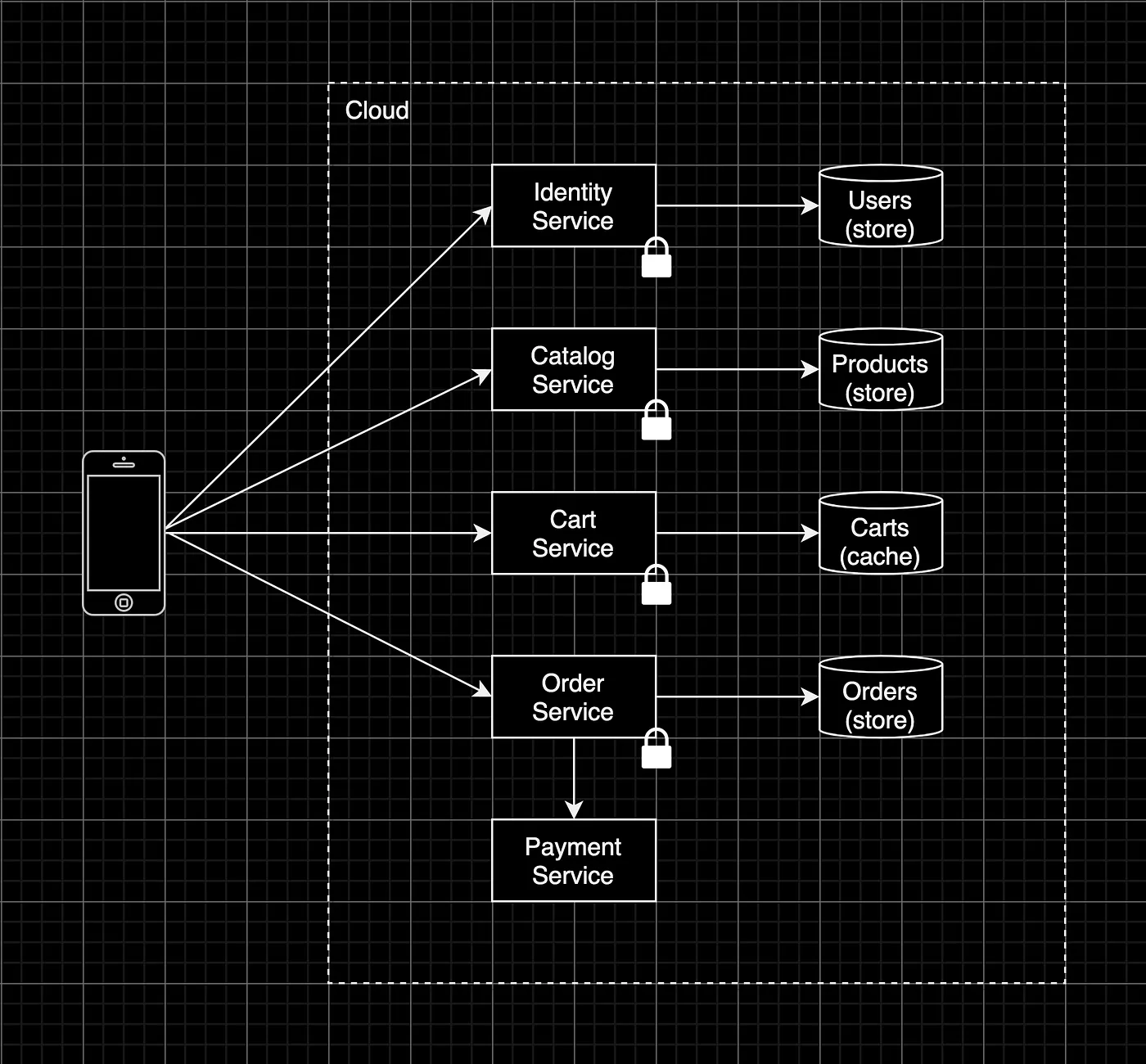
Direct client-to-service communication
In API management, direct client-to-service communication tends to increase API complexity and can come with unintended consequences:
- Tight coupling. Client apps directly depend on ever-changing API contracts of backend services.
- Duplication of knowledge. Each exposed service implements its own edge functions, such as SSL termination and rate-limiting.
- Many round trips. An excessive number of round trips over the network due to complex API composition flows could degrade performance.
- An increased attack surface. A lot more ports are now open, more services are exposed, and authentication just became a distributed issue as well.
“Improving maintainability does not necessarily mean reducing functionality; it can also mean reducing complexity.”
A Façade for the Back-end#
Properly designed abstractions can hide a great deal of implementation detail behind simple façades. API gateways provide this abstraction by encapsulating complex backend architectures while exposing a consistent and client-friendly API interface.
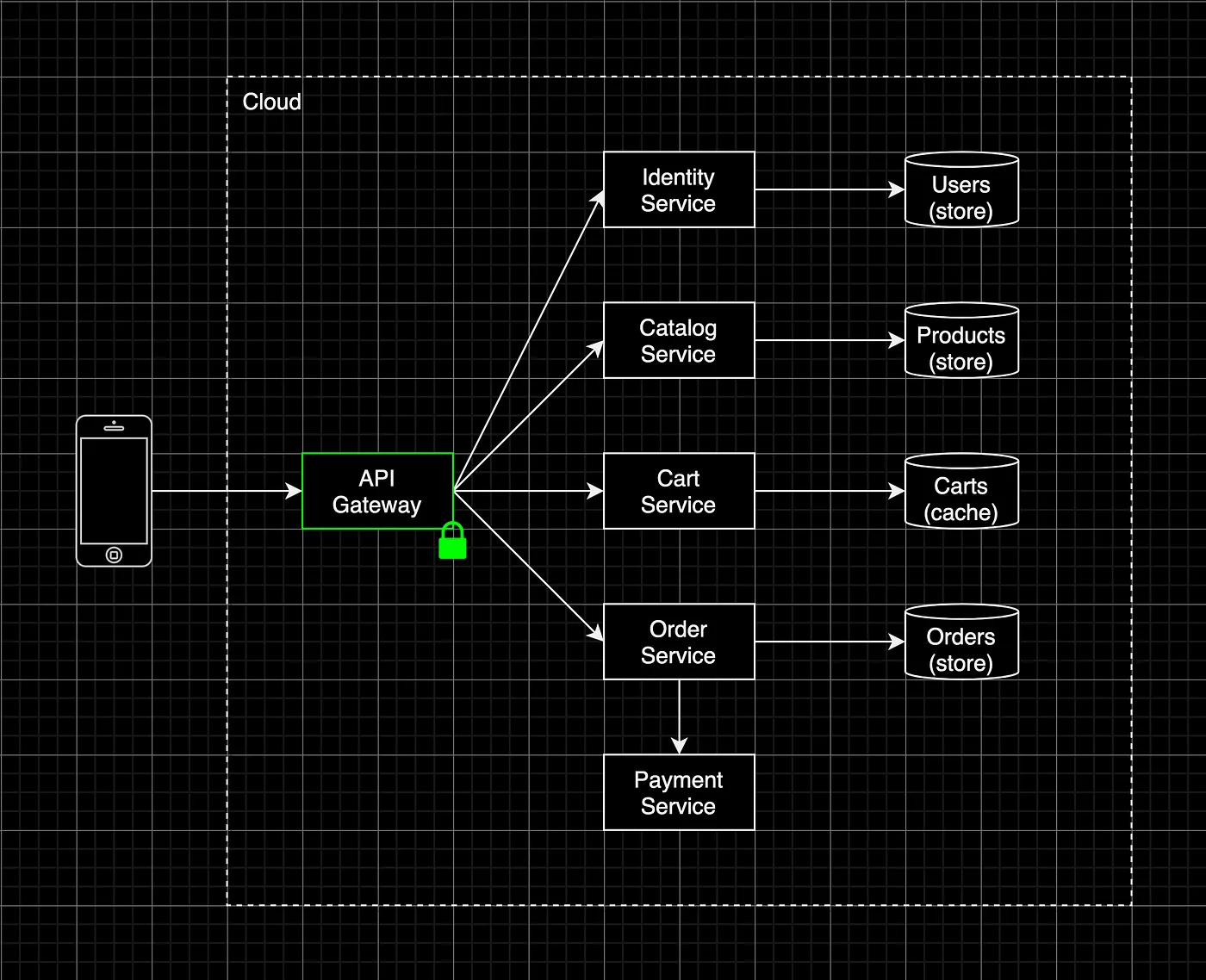
Communication through an API gateway
To keep the API complexity of (distributed) systems at a manageable level, API gateways help by:
- Decoupling clients from backend contracts. API routes are managed through a separate request routing configuration, keeping the client interface consistent.
- Consolidating cross-cutting concerns into one tier. Gateways reduce duplication and simplify each service by centralizing the responsibility for critical edge functions.
- Aggregating data across services. We can now apply API composition “server-side” by dispatching a single client request to several internal services and respond with an aggregated payload.
- Hiding internal services from the outside world. Exposing only the gateway reduces the network attack surface and allows for centralized API security management.
Declarative API Gateways with KrakenD#
The remainder of this post demonstrates a few common tasks performed by an API gateway through an example project.
Some of the popular (open source) API gateways available today include:
- Kong
- Tyk
- KrakenD
I’ve chosen KrakenD because of its:
- Simplicity. A docker image with a single configuration file is all you need.
- Statelessness and immutability. Being stateless, immutable, and independent from surrounding workloads simplifies maintenance and reduces coupling.
- Performance. With an additional network hop that every request will have to go through, you want it to be fast. KrakenD is built with performance in mind (~18,000 requests/second).
It adheres to the majority of twelve-factor app practices, an ideal candidate for container environments.
The Project#
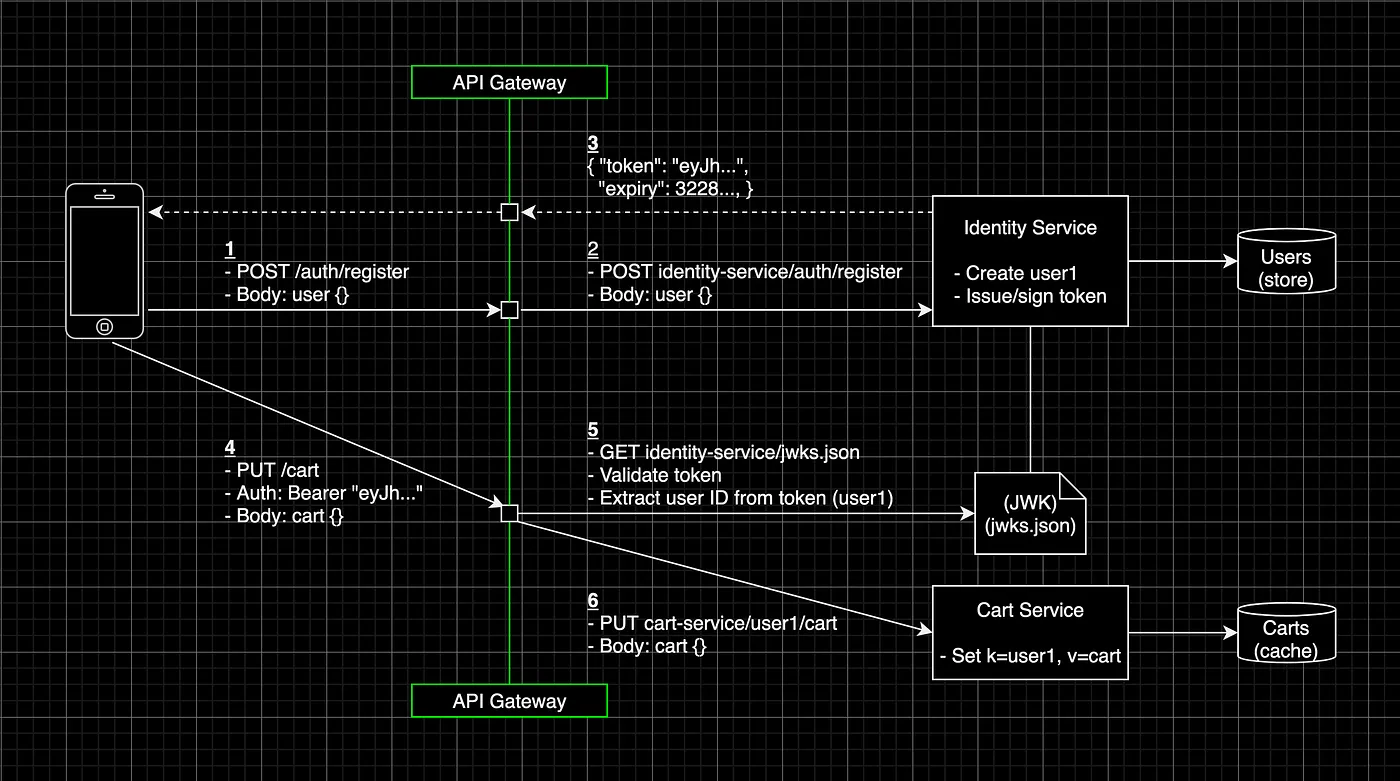
Example project process flow
The example application represents a portion of a larger e-commerce micro-service project with an iOS front-end. We’ll just use the following pieces:
Application:
- Cart service. A REST service written in GO that manages shopping carts for registered customers.
- Identity service. A REST service written in Typescript that manages customer accounts and issues JSON Web Tokens (JWTs).
- Gateway. A KrakenD (Community Edition) API gateway that handles request routing, authorization, payload validation, and rate-limiting.
Infrastructure:
- Kubernetes, Helm & Skaffold. All workloads are packaged through Kubernetes Helm charts. Skaffold handles the workflow for building and deploying the entire project onto your cluster.
- Docker Compose. Instead of Kubernetes, the project can also be built and deployed through Docker Compose.
Project structure:
├── identity-service/ (nodejs microservice)│ ├── src/│ ├── Dockerfile│ └── Makefile├── cart-service/ (golang microservice)│ ├── src/│ ├── Dockerfile│ └── Makefile├── kubernetes-helmcharts/│ ├── identity-service/│ ├── cart-service/│ └── gateway/├── krakend.yaml├── docker-compose.yaml└── skaffold.yamlVersions:
- Kubernetes: 1.21.2
- Helm: 3.3.3
- Skaffold: 1.27.0
- Docker: 20.10.5
- Go: 1.15.2
- NodeJS: 12.19.0
- KrakenD: 1.2
The complete source code of the example application is available on GitHub.
Build and Deploy with Docker Compose#
Install Docker and run:
$ docker compose up...[+] Running 3/3 ⠿ Container cart-service Started 4.0s ⠿ Container identity-service Started 5.8s ⠿ Container gateway Started 7.0sBuild and Deploy with Kubernetes, Helm, and Skaffold#
Create a Kubernetes cluster locally or in the cloud.
Install Skaffold and Helm, and deploy all helm-charts:
$ skaffold run --port-forward=user --tail...Waiting for deployments to stabilize... - deployment/cart-service is ready. - deployment/gateway is ready. - deployment/identity-service is ready.Deployments stabilized in 19.0525727sAPI Configuration as Code#
Create a new KrakenD manifest at project-root/krakend.yaml with the following contents:
---version: 2endpoints: []All I’m doing here is specifying the version of the file format.
Routing#
Add an endpoint object under the endpoints array and expose the GET /users identity service endpoint:
---...endpoints:- endpoint: /users method: GET output_encoding: no-op backend: - url_pattern: /users encoding: no-op sd: static method: GET host: - http://identity-service:9005- The
no-op(no-operation) encoding ensures client requests are forwarded to the backend as is, and vice-versa. staticresolution is the default service discovery setting and is what we’ll use for our Docker Compose network.
For Kubernetes deployments, set sd to dns (enabling DNS SRV mode).
Restart the gateway and execute a GET /users request:
$ docker compose restart gateway$ curl 'http://0.0.0.0:8080/users' \  --request GET \  --include
HTTP/1.1 401 Unauthorized...{  "status": 401,  "message": "No Authorization header"}
I’ve written custom JWT authorization middleware for the identity service for decoding and validating JWT payloads, configurable through:
---...identity-service: environment: - JWT_VALIDATION_ENABLED=true - JWT_PATHS_WHITELIST=/auth/register,/auth/login,/jwks.jsonLeave the above as is and extend krakend.yaml with register and login routes to issue JWT tokens from the identity service:
---...endpoints:- endpoint: /users ...- endpoint: /auth/register method: POST output_encoding: no-op backend: - url_pattern: /auth/register encoding: no-op sd: static method: POST host: - http://identity-service:9005- endpoint: /auth/login method: POST output_encoding: no-op backend: - url_pattern: /auth/login encoding: no-op sd: static method: POST host: - http://identity-service:9005Issue a JWT token by registering a new user and export it into your shell’s environment for later use:
$ docker compose restart gateway$ curl 'http://0.0.0.0:8080/auth/register' \  --request POST \  --header "Content-type: application/json" \  --include \  --data '{    "email": "som@ebo.dy",    "password": "pass"  }'
HTTP/1.1 201 Created...{  "token": "eyJhbGciOiJIUzI1NiIsInR5cCI6IkpXVCIsImtpZCI6InVzZX...",  "expiry": 1623536812}$ export TOKEN=eyJhbGciOiJIUzI1NiIsInR5cCI6IkpXVCIsImtpZCI6InVzZX...
Inject your token into the Authorization header and try fetching all users again:
$ curl 'http://0.0.0.0:8080/users' \    --request "GET" \    --header "Authorization: Bearer ${TOKEN}" \    --include
HTTP/1.1 401 Unauthorized...{  "status": 401,  "message": "No Authorization header"}
KrakenD does not send client headers to the backend by default.
Add a headers_to_pass property under the /users endpoint object to forward the Authorization request header to the backend:
---...endpoints:- endpoint: /users ... headers_to_pass: - Authorization backend: ...With the Authorization header forwarded, we can now retrieve all users:
$ docker compose restart gateway$ curl 'http://0.0.0.0:8080/users' \    --request "GET" \    --header "Authorization: Bearer ${TOKEN}" \    --include
HTTP/1.1 200 OK[{   "id":"f06b084b-9d67-4b01-926b-f90c6246eed9",   "email":"som@ebo.dy"}]
Offloading Authorization#
Let’s not write custom GO authorization middleware for the cart service but shield its endpoints by offloading this cross-cutting concern to the gateway.
The JSON Web Key Set format is used to expose our token integrity verification key(s) to the gateway. For simplicity, I went for a symmetric signature generation with the HS256 algorithm (HMAC-SHA256) when writing the identity service (our identity provider):
$ echo -n 'secret' | openssl base64c2VjcmV0Our JWKS contains the same symmetric key, statically hosted at identity-service/jwks.json:
{ "keys": [ { "kty": "oct", "kid": "userid", "k": "c2VjcmV0", "alg": "HS256" } ]}kty is the key type (octet string), kid the key id (identifies the key in the set), k the key, and alg the algorithm.
For more about the JWK standard, refer to the RFC document.
Append a PUT /cart endpoint to the manifest and shield it from unregistered customers through the krakend-jose validator plugin:
---...- endpoint: /cart method: PUT output_encoding: no-op extra_config: github.com/devopsfaith/krakend-jose/validator: alg: HS256 jwk-url: http://identity-service:9005/jwks.json disable_jwk_security: true kid: userid backend: - url_pattern: /cart encoding: no-op sd: static method: PUT host: - http://cart-service:9002Here we specify the “key ID” and allow HTTP access to our privately hosted JWKS by setting disable_jwk_security to true.
Execute a PUT /cart request with a valid token to update the user’s cart:
$ docker compose restart gateway$ curl 'http://0.0.0.0:8080/cart' \  --request "PUT" \  --header "Content-type: application/json" \  --header "Authorization: Bearer ${TOKEN}" \  --include \  --data '{    "items": [{      "productid": "94e8d5de-2192-4419-b824-ccbe7b21fa6f",      "quantity": 2,      "price": 200    }]  }'
HTTP/1.1 400 Bad Request...{  "message": "Bad request: no userID"}
The cart service expects the client’s user ID to be prepended to all paths. The user ID could manually be extracted from the JWT payload as embedded in the userid JWT claim.
Fortunately, we can access validated JWT payloads through the KrakenD JWT variable and pass it to the cart endpoint’s backend object:
---...- endpoint: /cart ... backend: - url_pattern: /{JWT.userid}/cart ...If we execute the PUT /cart request again, it should successfully create or update the cart:
$ docker compose restart gateway$ curl 'http://0.0.0.0:8080/cart' \  --request "PUT" \  --header "Content-type: application/json" \  --header "Authorization: Bearer ${TOKEN}" \  --include \  --data '{    "items": [{      "productid": "94e8d5de-2192-4419-b824-ccbe7b21fa6f",      "quantity": 2,      "price": 200    }]  }'
HTTP/1.1 201 Created...{  "items": [    {      "productid": "94e8d5de-2192-4419...",      "quantity": 2,      "price":200    }  ]}
The next step would be refactoring GET /users to offload JWT validation from the identity-service as well.
I will leave this as an exercise. Before you start though, make sure to disable the service level JWT validation at the identity service:
---identity-service: ... - JWT_VALIDATION_ENABLED=false # offloaded to the gateway! ...$ docker compose down && docker compose upValidation#
The following example is purely for illustrative purposes and shows how KrakenD can perform schema-based JSON validation. It might be wise not to couple the gateway with business logic (unlike this example), ensuring services stay within their boundary.
For illustrative purposes, let’s specify that the email and password fields of the /register endpoint are required and must be of type string:
---...- endpoint: /auth/register method: POST output_encoding: no-op extra_config: github.com/devopsfaith/krakend-jsonschema: type: object required: - email - password properties: email: type: string password: type: string backend: ......First, change the email key to send an invalid payload:
$ docker compose restart gateway$ curl 'http://0.0.0.0:8080/auth/register' \    --request POST \    --header "Content-type: application/json" \    --include \    --data '{      "emai": "no@ebo.dy",      "password": "pass"    }'
HTTP/1.1 400 Bad Request
Correct your payload and verify that the request succeeds:
$ curl 'http://0.0.0.0:8080/auth/register' \    --request POST \    --header "Content-type: application/json" \    --include \    --data '{      "email": "no@ebo.dy2",      "password": "pass"    }'
HTTP/1.1 201 Created{  "token":"eyJhbGciOiJIUzI1NiIsInR5cCI6IkpXVCIsImtpZCI6InVzZXJ...",  "expiry":1625254416}
Rate limiting#
Lastly, we will focus on traffic management. To protect our services from excessive use, whether intended or unintended, we can rate-limit critical or unshielded paths and establish a usage quota for our clients.
First, bombard our /register endpoint with 100 request and see what happens:
for i in {1..100}; do curl 'http://0.0.0.0:8080/auth/register' \  --request POST \  --header "Content-type: application/json" \  --include \  --data '{    "email": "d[@d.os",    "password": "pass"  }';done
HTTP/1.1 201 CreatedHTTP/1.1 409 ConflictHTTP/1.1 409 Conflict...HTTP/1.1 409 Conflict # 100
Every request is being handled by the identity service, leading to excessive processing and database communication.
Now add a limit of 5 requests per second (per IP address) and a cap of 100 request per second in total for the /register endpoint:
---...- endpoint: /auth/register ... github.com/devopsfaith/krakend-jsonschema: ... github.com/devopsfaith/krakend-ratelimit/juju/router: maxRate: 100 clientMaxRate: 5 strategy: ip ......Notice how the gateway short-circuits all requests exceeding our quota:
$ docker compose restart gatewayfor i in {1..100}; do curl 'http://0.0.0.0:8080/auth/register' \  --request POST \  --header "Content-type: application/json" \  --include \  --data '{    "email": "d[@d.os",    "password": "pass"  }';done
HTTP/1.1 201 CreatedHTTP/1.1 409 Conflict...HTTP/1.1 429 Too Many Requests...HTTP/1.1 429 Too Many Requests
Know When to Stop#
As vendors in the API market keep adding features to differentiate their products, it’s important to know when to stop offloading responsibility to the edge. Bloated and overambitious gateways are difficult to test and deploy.
Apart from having too many responsibilities, other possible concerns include:
- Single point of failure. As a single entry point for the backend layer, we must ensure the gateway is resilient. Avoid single points of failure through redundancy, elasticity and failure recovery mechanisms.
- An additional service to maintain. Will the effort of maintaining the gateway incur technical debt? What does it mean for the responsibilities of the development team?
- An additional network hop. The gateway can increase the response times due to the additional network hop to the backend. Though this has less impact than direct client-to-backend requests, it remains important to load-test the system consistently, so we meet our SLO’s with confidence.
Wrapping Up#
API gateways provide a dependable interface for clients and a central point for managing requests and responses.
In a distributed architecture, they can be used to offload cross-cutting functionality that would otherwise have to be replicated. An API gateway comes with many advantages, but it also adds another component to maintain and optimize for performance and reliability.
Thanks for reading.

Review Is the Capacity Plan for Coding Agents
Spotify's coding agent went from 1,000 merged PRs in three months to the same number in ten days, and the team's own talk names what happened next: a pile of PRs nobody had time to review. Once agents write the changes, the capacity worth planning is CI and human review, and the first fix is moving verification out of the agent's sandbox.

The Validator Is the Platform
An InfoQ playbook cut an LLM system's hallucination rate from 15% to 1.5% without touching the model, and the article credits most of that to plain code that checks the output before anything uses it. That code is the part a platform team should own, and what it's worth depends on whether it checks the model's word or checks the world.

Proxy Variables Are Not an Egress Policy
Injecting HTTPS_PROXY into every pod at admission works fine for apps that cooperate, and an agent is a workload you can't count on to cooperate. Two recent OpenAI incident reports show an agent getting told no and going looking for another way out, so the egress decision has to be enforced below the workload by something it can't read or route around.