Exploring Modern iOS Architectures
MVC, MVVM, MVP and VIPER: the same TMDb movie app built four ways, compared on orthogonality, ease of use, and testability.
This project structures my knowledge of modern architectural patterns by building the same movie app four ways: MVC, MVVM, MVP, and VIPER. The app uses the TMDb API (with static JSON files included for quick runs), so the only thing that changes between targets is the architecture.
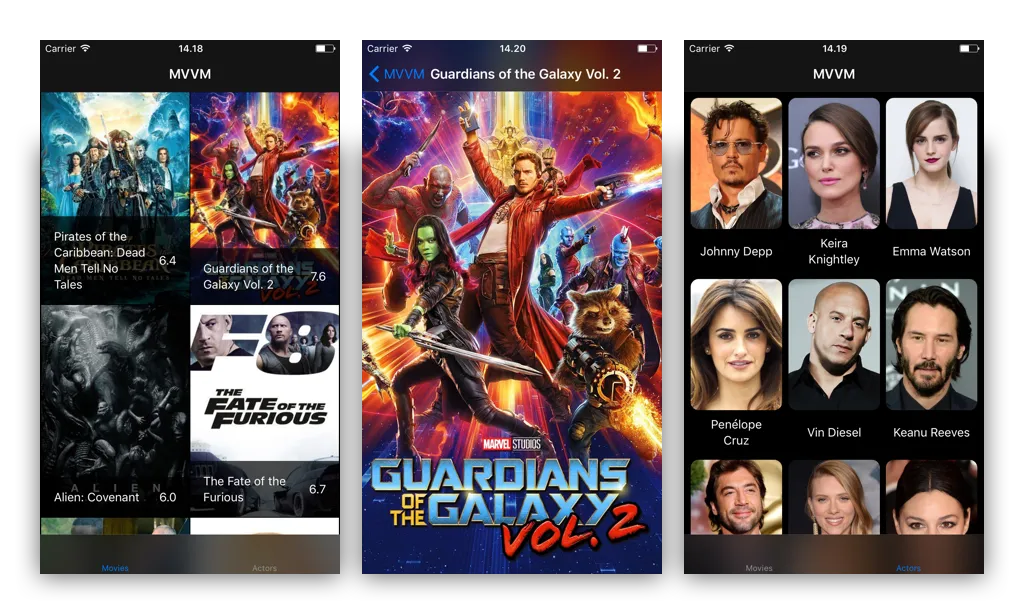
The same app across every target: a results grid, a movie detail, and a cast list.
The code is written with readability and learning in mind, so using these in production may call for performance work or other changes. As I work through each one I keep three questions in view.
MVC
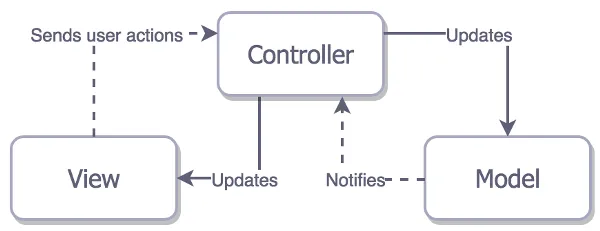
Apple’s MVC: the Controller mediates between Model and View.
- Model
- Conceptual domain model, representing real-state content
- Data-layer objects and business logic (stores, managers)
- View
- Cells,
UIViewobjects and subclasses - Sends actions to the Controller
- Cells,
- Controller
- Mediator between View and Model
- Delegate and data source of almost everything
- Dispatches and cancels network requests
- Manages the View lifecycle (tightly coupled)
The Controller ends up owning almost everything, which is why MVC is the quickest to stand up and the hardest to keep orthogonal as a screen grows.
MVVM
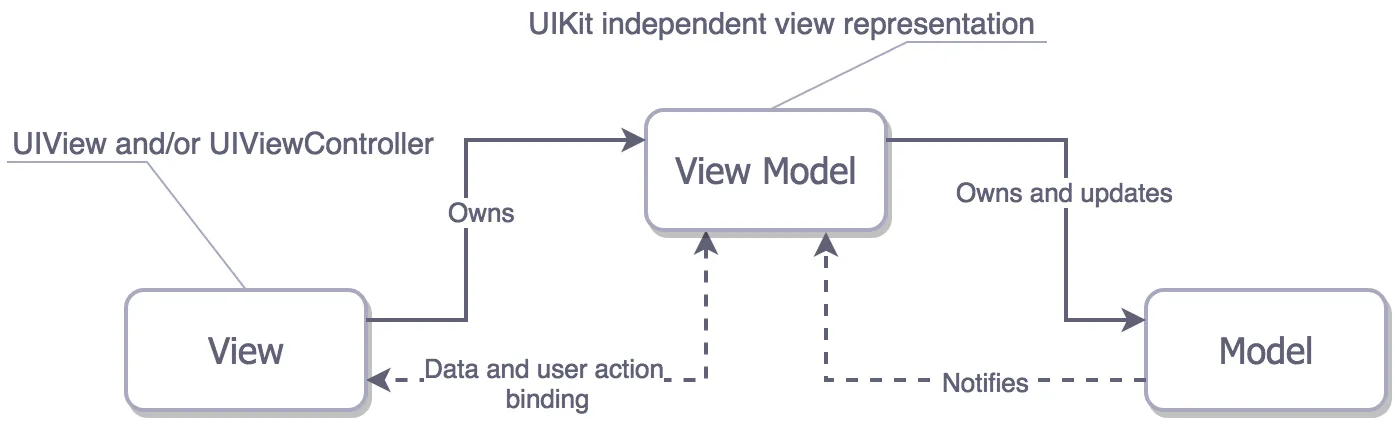
MVVM: the ViewModel is a UIKit-free abstraction of the View, connected through bindings.
- Model: conceptual domain model, representing real-state content
- View: structure, layout, and appearance (
UIViewControllers, cells,UIViews); updates its state from the ViewModel via bindings and forwards events to it - ViewModel: an abstraction of the View exposing public properties and commands; a
UIKit-independent representation of the View - Binder: a (reactive) data-binding technology is key to the pattern; this simple example achieves binding through callbacks instead
The defining rule: the ViewModel never imports UIKit. It exposes display-ready values and a closure the View binds to, so the View stays thin and the formatting logic becomes testable in isolation.
// MVVM ViewModels should not access UIKitfinal class MovieViewModel: ViewModelInterface {
    private var movies = [Movie]() { didSet { modelUpdate?() } }    var count: Int { return movies.count }
    // The View binds a reload closure; the ViewModel invokes it on model change.    private var modelUpdate: (() -> Void)?    func bindViewReload(with modelUpdate: @escaping () -> Void) {        self.modelUpdate = modelUpdate    }
    func fetchNewModelObjects() {        DataManager.shared.fetchNewTmdbObjects(withType: .movie) { result in            switch result {            case let .success(transportables):                self.movies = transportables as! [Movie]            case let .failure(error):                print(error)            }        }    }
    // viewModel[i] -> a UIKit-free, display-ready value    subscript (index: Int) -> Transportable { return presentableInstance(from: movies[index]) }}
MVP
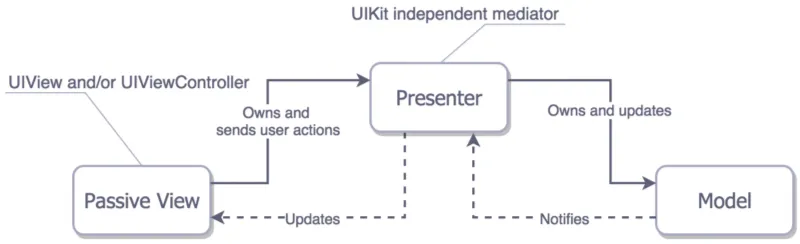
MVP: a passive View delegates everything to the Presenter.
- Model: conceptual domain model, representing real-state content
- View: passive
UIViewControllers, cells,UIViews; may not know about the Model or execute presentations; delegates user interactions to the Presenter - Presenter: acts upon the Model and the View; holds the logic for user interactions; retrieves data from the Model and formats it for display
MVP draws the View/Presenter boundary with protocols. The View only knows how to reload and show; the Presenter owns everything else, which makes the Presenter trivially testable against a mock View.
// The View is passive: it only knows how to reload and show.protocol ResultsView: class {    func reloadCollectionData()    func show(_ detailVC: DetailViewController)}
// The Presenter holds the logic and formats data for the View.protocol ResultsViewPresenter: CollectionViewConfigurable {    var objectsCount: Int { get }    init(view: ResultsView)    func presentableInstance(index: Int) -> Transportable    func presentNewObjects()    func presentDetail(for indexPath: IndexPath)}
VIPER
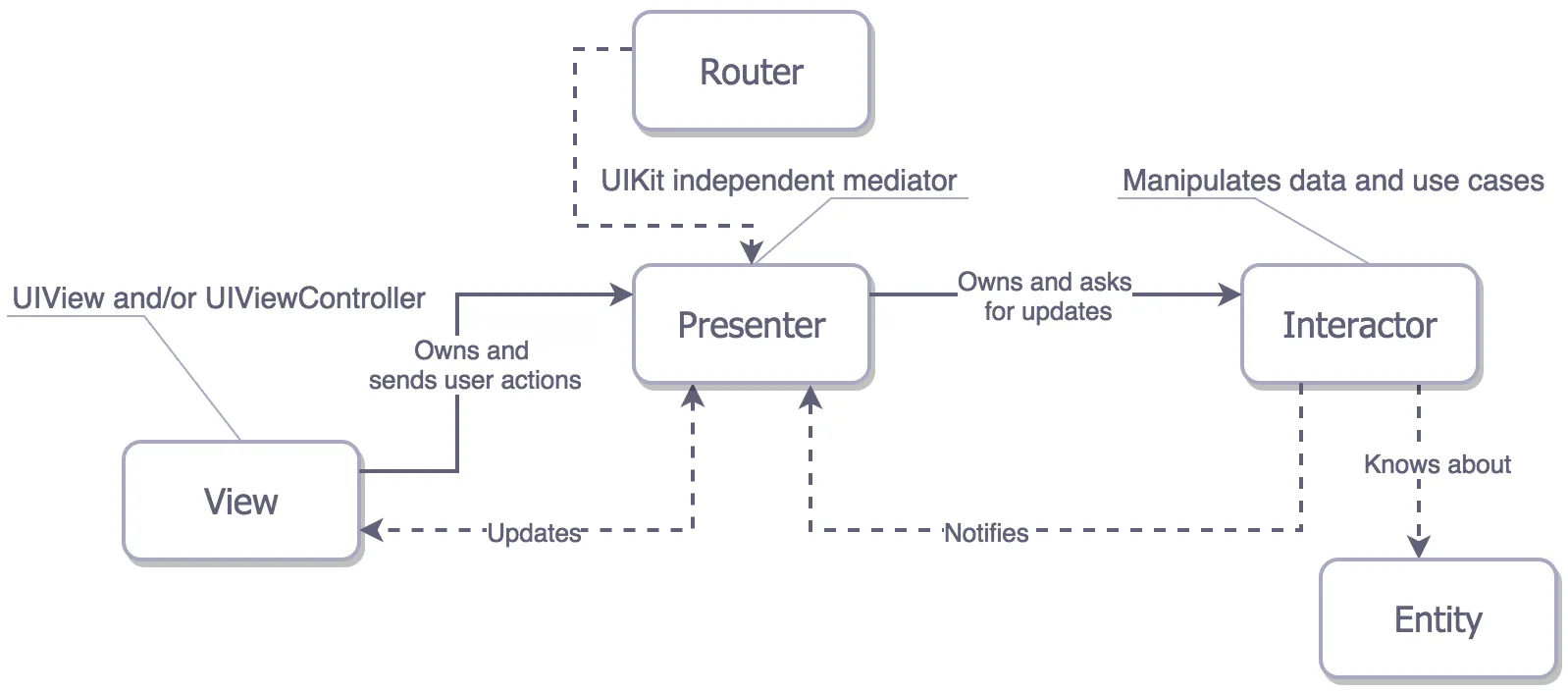
VIPER: business logic moves into the Interactor; navigation into the Router.
- View: displays what the Presenter tells it to and relays user input back
- Interactor: contains business logic for a use case; its work is independent of any UI
- Presenter: prepares content for display (received from the Interactor) and reacts to user input
- Entity: conceptual domain model, only manipulated by the Interactor
- Routing: navigation logic; shared between the Presenter and a Wireframe that handles transition animations
VIPER takes the MVP idea to its conclusion: every collaborator is a protocol boundary. The repo has separate protocol files for the View, Presenter, Interactor, and Router, giving maximum separation and testability at the cost of many small files.
protocol ResultsPresenterInterface: class { func updateView() func showDetail(forPresentable object: Transportable) func collectionConfiguration() -> CollectionViewConfigurable}References
- The Pragmatic Programmer
- iOS Architecture Patterns (Medium)
- Protocols and MVVM in Swift to avoid repetition
- Introduction to Protocol-Oriented MVVM
- VIPER (objc.io)
The full Xcode project, all four architectures behind one app, lives in the project repository on GitHub.

Review Is the Capacity Plan for Coding Agents
Spotify's coding agent went from 1,000 merged PRs in three months to the same number in ten days, and the team's own talk names what happened next: a pile of PRs nobody had time to review. Once agents write the changes, the capacity worth planning is CI and human review, and the first fix is moving verification out of the agent's sandbox.

The Validator Is the Platform
An InfoQ playbook cut an LLM system's hallucination rate from 15% to 1.5% without touching the model, and the article credits most of that to plain code that checks the output before anything uses it. That code is the part a platform team should own, and what it's worth depends on whether it checks the model's word or checks the world.

Proxy Variables Are Not an Egress Policy
Injecting HTTPS_PROXY into every pod at admission works fine for apps that cooperate, and an agent is a workload you can't count on to cooperate. Two recent OpenAI incident reports show an agent getting told no and going looking for another way out, so the egress decision has to be enforced below the workload by something it can't read or route around.